|
Low Budget
Laser Graphics System
Many experimenters would like to build a
graphics system to use with their laser. Most graphics systems are expensive
professional systems costing thousands of dollars and offering a host of
features and effects. Here we describe the lowest cost possible X-Y graphics
system you can build. We are assuming that you are friendly with your
soldering iron and have the tools and experience to build the system.
Note: Since this article was originally published on our
web site, new products and systems have become available. We have
included these in an Update section at the end of the original article.
Projector
The limiting factor in graphics
projection is the scanning system which forms the heart of the projector.
You need scanners that are fast enough and accurate enough to follow the
complex graphic signal. Most professional projectors use closed loop galvos
with position detection and high quality drive amps costing $2,400 US$ and
up.
The low cost alternative is to use open loop galvos with
special drive amps. Open loop galvos such as the General Scanning G124, G114
and G112 have the speed required to do graphics but no position detecting
device. When driven by 'Accelerator' type amps, a position signal can be
derived from the back EMF in the coils and used to improve the accuracy of
the scanners. These type amps are available from Lighting Systems Design
Inc. (LSDI) who make the 'Accelerator124' which is optimised for use with
the G124 galvos.
In addition to the amps you will need a suitable power
supply. Scanners are bi-polar devices so you will require a bi-polar power
supply which can deliver +/- 15 to 18 VDC. As a rule of thumb each
scanner will consume one amp of current so your supply has to provide a
minimum of 2 amps. Since you may want to add additional items like a shutter
or effects wheels later, it is best to get a larger supply (3 to 4 amps) to
allow for expansion. The additional cost of the larger supply is often only
15% to 25% more than the small supply and is well worth the extra. You will
need to mount the power supply into a box along with the scan amps and any
size, position and image invert controls you need. The cables that carry the
scan signals from the amps to the scanners should be kept to around 1 meter
(3 ft) or less for best results.
You will require a pair of small front surface mirrors
with mounts to fit onto the shafts of the galvos. The usual arrangement has
been to have an X mirror of 5 X 5 mm and a Y mirror of 5 X 7 mm. For best
performance and to eliminate having to stock different kinds of spares, a
pair of 5 X 5 mm mirrors would be best.
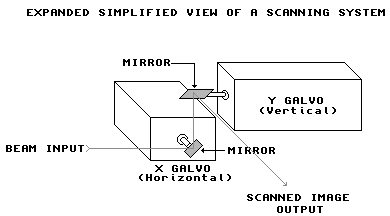
The scanners have to be held in a rigid
relationship at right angles to one another and with the mirrors as close
together as possible in a scan stage or scan head. This can be as simple as
two small pieces of 5 mm (3/8") aluminium plate bolted together to form
a right angle, and that have holes drilled to accommodate the scanners. The
more professional approach is to use a scan head - a small box that holds
the scanners and mounts on a spigot. This allows the scan pair to be rotated
about the incoming beam so that the image can be positioned without tilting the laser projector.
Laser
Naturally you will need a laser. The
typical diode laser is small enough that it could be mounted directly to the
scan head giving a projection system that occupies a very small space. With
a HeNe of small argon laser you will need a base-plate to mount the laser
and the scan head. A piece of 5 mm (3/8") aluminium will work fine. If
you are using a scan head, then it is easier to adapt the projector to
different lasers than with a right angle stage assembly.
HeNe lasers are available from many sources, both new and
surplus, and are relatively low cost at powers up to 7mw [7/1000 of a watt].
Prices of HeNe's then escalate sharply with the cost of a 50 Mw HeNe equal
to the price of a small air-cooled argon laser. The most popular small argon
laser is the '60X' type and there are many used and reconditioned units
available.
A low power HeNe laser is great for experimenting and
producing small graphic and abstract images in a dark room. If you want to
produce beam effects in a small room you will need a higher power laser such
as a small argon laser producing 100 mW or more - in larger spaces you will
need a laser with watt or more of power - particularly if you want to make
beam effects.
Graphics
Software
You can obtain free X-Y graphics software
by downloading the original Pangolin LSD1000 software. This is Pangolin's
original laser graphics software from several years ago and once sold for
$750 US$ per copy. It is now available free as no updates or technical
support are provided (other then the documentation that comes with the
software). The software can do animations, text and beam effects and
features an array of tools to make image creation and editing relatively
simple. To download the software, visit http://www.pangolin.com/products/pricelist-lsd1000.htm
LSD1000 format animations, graphics and beam effects
can be obtained from Laser F/X or traded with others using the LSD1000
system. There are some LSD1000 format frames available for download in
the Frames Archives section of the Archives
and Download area of our site.
There are also a number of low cost PC based packages
available. One that we have seen in action and that offers a number of
features is the Laser Illusions system. This has an outboard card that
attaches to the parallel port of an IBM compatible computer. You can contact
Rick Gebhardt by e-mail to LaserIl@aol.com
for more info.
Computer
System
The Pangolin software runs on Amiga computers only
so you will have to obtain one and modify it to make the outputs suitable
for use with the scanning system. Only the A500, A600, A600HD and A2000 are
suitable for modifications. Some of these Amiga computers use SMT (Surface
Mount Technology) which is difficult to modify the A500 and A2000 are the
easiest to modify. Used A500's sell for between $300 and $600 $US in
computer papers or through Amiga user groups, while a used A2000 will cost
between $500 and $800 US$ depending on the accessories. The A500's typically
do not have hard drives although an outboard plug-in hard drive was
manufactured by Commodore and others and may still be available. The
software runs fine from floppy disk but is a lot slower loading frames than
using a hard drive.
You will need at least 1 Meg of memory to run the
software and to hold one bank of 256 images. If you can acquire a computer
with 2 or more meg of memory you can hold the software plus three banks of
256 frames in 2 Meg, more with a larger memory.
Modifications
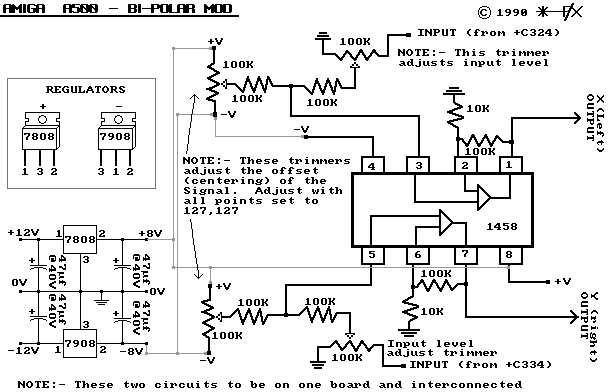
The computer's sound output section needs
to be modified to pass DC and to create a bi-polar output for the scanners.
The modification is simple if you are familiar with op-amps as it consists
of a 1458 dual op amp, a small DC power supply and a few resistors.

Note: While this circuit is labeled
A500 bi-polar mod, it will work with any model Amiga except the original
A1000 model.
Once
the board is installed you will have to adjust the trim pots to centre the
laser beam when no graphics signal is present and then adjust the gain to prevent
the images from clipping (flattening the edges of the graphics). You
will now have a system capable of displaying X-Y graphics (no blanking) at
up to 12K PPS. This is suitable for entertainment graphics and is especially
well suited to dynamic beam effect generation.
Parts
list and approximate budget
This parts list and budget is based on
the LSD1000/Amiga system... costs may vary if another graphics
computer/software combination is used
-
Two General Scanning G124 galvos [new about $350 US$/ea.
- used ones start at $100 US/ea. when you can find them] Sources:
General Scanning, LSDI, New
Method Lasers, or occasionally in the Unclassified
Ads.
-
Two 5 mm square scanner mirrors [new about $50 US$/ea.]
Sources: LSDI, Precision Projection (General Scanning sells them but
charges too much).
-
Scan head or scan stage [stages can be made by you local
machine shop for around $60 US$ but you need to know what you are doing
in terms of hole placement].
-
Two Accelerator type scan amplifiers [$150
US$/ea]. from
LSDI or New
Method Lasers
-
Power supply +/- 15 to 18 VDC at 3 Amps [around $150 to
$200 US$] Sources: Newark electronics, Power One, Condor, Hammond.
-
One used Amiga computer with monitor and 1 Meg of memory
minimum [cost varies depending on HD and memory - from $300 to $700 US$]
Sources: Contact the local Amiga users group, local computer papers,
visit Amiga sites on the net such as National
Amiga.
-
Modifications to the computer will require some parts
and a small project board [$25-35 US$] from local electronics suppliers
[Radio Shack or others]
-
Cabinet, cables, plugs, switches and other shop parts
that will be needed for final assembly [budget around $150 to $200 US$
to do a good job].
Update
Since this original article was written,
new equipment and technology has become available at reasonable
prices. Here is an update:
Galvos: There are now two excellent low-cost
options available:
-
The Catweazle scanners from MediaLas in Germany will go
at speeds up to the 30K ILDA standard. The come almost ready to go
with the scanners mounted in the correct relationship on a right angle
bracket and an assembled and tuned scan amp that simply needs to have
220V or 110V [switch selectable] power, and scanning signals
applied. The only limitation is that the scanners can not take
more than 3 watts of laser power but this should not be a problem in
small systems. The Catweazle scanners are available from MediaLas
or New
Method Lasers for about $995.00 US$ which is not much more than the
"accelerator" system described above but has far better
quality and a lot less work to assemble.
-
The Eye Magic scanners will also go at speeds up to the
ILDA 30K standard. They come as a pair of scanners with mirrors
and drive amps. You must supply or purchase a scanner mounts, and
you will need a power supply and will have to do a little wiring to
assemble them. Since they use mirrors on mounts, they can be used
with lasers over 3 watts in output. Eye Magic scanners are
available from New
Method Lasers for about $995.00 US$ which is not much more than the
"accelerator" system described above but has far better
quality.
Lasers: New green DPSS laser diodes and modules
are available at reasonable prices. They operate at 532 nM which is
very close to the peak of the spectral sensitivity of the human eye.
Thus a 5 mW 532 nM laser appears as bright to the eye as a 15-20 mW HeNe laser
so you get more "bang for the buck". Many of the lower power
DPSS lasers also have a modulation input that allows you to vary the
brightness of the laser. This can be used for blanking when projecting
graphics from a graphics system that supports blanking and eliminates the
need for an external blanking device cutting small projector costs.
DPSS modules and drivers are available from MediaLas
Graphics: There are now two additional choices
for low cost graphics systems:
-
The LaserMAX program for the Amiga is share-ware and can
be downloaded from the Archives
and Download area of the Backstage. You still have to modify
an Amiga computer as described above, but this program offers more
"bells and whistles" than the LSD1000 program.
-
Rick at Laser
Illusions has a new interface card with ILDA output and more sophisticated
software for around $500.00 US$. The system supports full RGB
colour output for 16.7 million colours and blanking so it is ideal for
those who would like to move up to a more professional systems as funds
become available.
DISCLAIMER:
Some of the information in the Backstage area is provided by the persons or
companies named on the relevant page(s). Laser F/X does NOT endorse or
recommend any products/services and is NOT responsible for the technical
accuracy of the information provided. We provide this information as a
service to laserists using the Backstage area.
[ Introduction
| Hobby
Archives | Hobby
FAQ | Laser
Construction ]

© 1996-2002
Laser
F/X International and LaserFX.com 905-523-7669 - All rights reserved.
Logos and trademarks are the property of their respective owners - used
by permission.
|