|
|
|
|
|
Home Page >>> Backstage Area >> Laser Show Systems > Pinouts |
 |
 |
 |
|
Laser Show Systems - Pinouts DISCLAIMER: The pinouts shown here were contributed by manufacturers, vendors and individuals. While every effort has been made to insure accuracy, LaserFX.com can not be responsible for any errors or omissions.
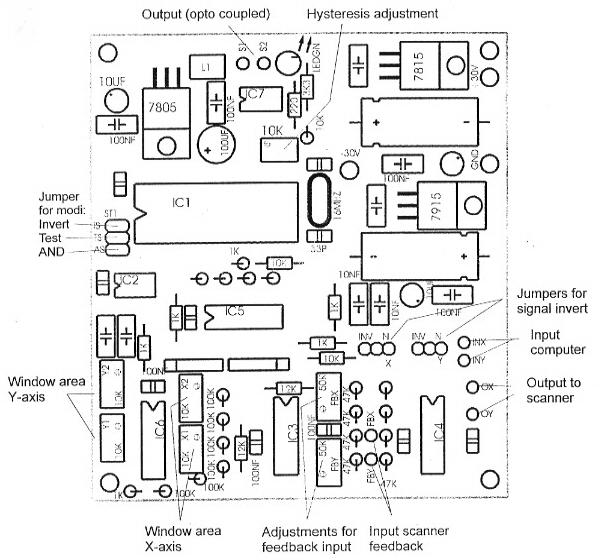
MediaLas CatSafe Scan Fail Detection Board Pinout for the MediaLas CatSafe scan fail detection board. This is not an official MediaLas document, for the latest version, contact info@medialas.com
Tips and Hints 1/ make all connections as shown. Adjust feedback trimmer [FBX and FBY] to the same level as the computer input signal. 2/ Connect S1 to the blanking signal coming from the computer. 3/ Connect S2 to the blanking input of the PCAOM. Under safe conditions, the signal from S1 is passed directly out to S2. When a scan failure is detected, this connection is broken blanking the beam and the LED comes on. 4/ The safe scanning window is set by default [with trimmers Y1 and Y2, X1 and X2] to fully open at the factory. Using a full screen grid, adjust the trimmers to provide the desired windowing of the safe area. 5/ Project a small horizontal line from the computer at an unsafe size. 6/ Adjust the hysterisis control until the line disappears. Increase the size of the line and it should reappear. 7/ For maximum safety, the +30, Ground and -30 should be connected to the power supply points at the scan amps. NOTE: Inputs should not be inverted against one another [either both X and Y must be set in normal or inverted mode with the jumpers].
DISCLAIMER: Some of the information in the Backstage area is provided by the persons or companies named on the relevant page(s). Laser F/X does NOT endorse or recommend any products/services and is NOT responsible for the technical accuracy of the information provided. We provide this information as a service to laserists using the Backstage area. [ Introduction - System Design - Scanning Systems - Support Equipment - Laser Graphics - Show Production - Pinouts ]
|
 |
©
1996-2008
Laser
F/X International and LaserFX.com - All rights reserved. |
|
|